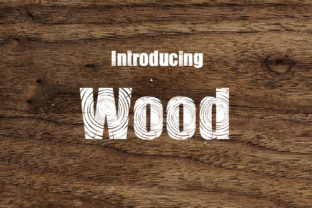
Wood: A Unique Decorative Typeface with a Wooden Motif
Wood is more than just a font—it’s an artistic expression that brings warmth, texture, and character to any design project. With its striking wooden motif, this decorative typeface adds an unique touch to visuals, making it a popular choice among designers, creators, and entrepreneurs looking to stand out. Whether you're crafting name cards, logos, posters, or magazine covers, Wood can transform your message into something memorable.
However, like any design tool, using Wood effectively requires understanding its strengths and limitations. Many designers make common mistakes when choosing or applying this typeface, which can affect the overall quality of their work. Let's explore these pitfalls and how to avoid them.
Understanding What Wood Offers
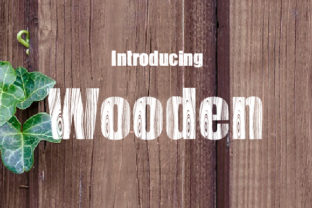
Wood is a decorative typeface that mimics the natural grain and texture of wood. Each character features subtle variations in stroke weight and texture, giving the impression of being carved from real wood. This makes it ideal for projects where a rustic or organic feel is desired.
Designers often choose Wood for its ability to add personality and visual interest. It works particularly well in branding, advertising, and editorial design where a unique visual identity is crucial. The typeface is available in multiple weights and styles, offering flexibility depending on the context of use.
Common Mistakes When Using Wood
While Wood is visually appealing, some designers overlook important details that can impact the effectiveness of their designs. Here are a few common mistakes to be aware of:
- Overusing the Font: Applying Wood to every element of a design can lead to clutter and reduce readability. It's best used sparingly, such as for headlines or key messages, rather than body text.
- Ignoring Readability: Because of its decorative nature, Wood may not be suitable for long blocks of text. Reading extended passages in this font can become tiring for the viewer.
- Mismatching with Other Fonts: Pairing Wood with incompatible fonts can create a disjointed look. It works best with clean, sans-serif fonts that provide contrast without competing for attention.
- Incorrect Color Choices: The wooden texture of the font looks best when paired with earthy tones like browns, greens, and beiges. Using bright or neon colors can clash with the natural aesthetic.
How These Mistakes Affect Your Design
Each of these mistakes can have a significant impact on the final outcome of your design. Overuse of Wood can distract from the main message, while poor readability can reduce engagement. Choosing the wrong color palette might also undermine the intended aesthetic, leading to a less cohesive visual experience.
Additionally, mismatched fonts can confuse the viewer and diminish the professionalism of your work. Ensuring that all elements of your design complement each other is essential for creating a polished and effective result.
Practical Tips for Using Wood Effectively
To make the most of Wood, consider the following tips:
- Use It Strategically: Reserve Wood for headings, titles, or short phrases where its decorative qualities will enhance the design without overwhelming the content.
- Pair with Complementary Fonts: Choose a simple, modern font for body text to balance the ornate style of Wood. This creates a harmonious contrast and improves readability.
- Experiment with Color: Try different earthy tones to find the perfect match for your project. Soft gradients or textures can also enhance the wooden effect.
- Test on Different Backgrounds: Wood looks best against light or neutral backgrounds. Dark or busy backgrounds can obscure the texture and detail of the font.
What to Check Before Using Wood
Before incorporating Wood into your design, take a moment to evaluate a few key factors:
- Licensing: Ensure that you have the right to use Wood for your specific project. Some fonts require commercial licenses for certain uses.
- Font Quality: Download the font from a reputable source to avoid issues with file corruption or missing characters.
- Compatibility: Test the font across different platforms and devices to ensure it displays correctly everywhere.
- File Formats: Make sure you have the correct file formats (like OTF or TTF) for your design software.
Real-World Examples of Wood in Action
Wood has been successfully used in various creative fields. For example, a small café might use it for their logo and signage to create a warm, inviting atmosphere. Similarly, a blogger could incorporate Wood into their header or post titles to give their site a distinctive look.
Another example is a boutique clothing brand that uses Wood on their product tags and packaging to reinforce a natural, handmade feel. In each case, the font contributes to the brand's identity while maintaining clarity and appeal.
By using Wood thoughtfully, you can elevate your designs and leave a lasting impression on your audience. Avoid common pitfalls by focusing on usability, aesthetics, and compatibility. With the right approach, Wood can become a powerful tool in your creative toolkit.